FreeAutoCAD LISP

TabloAktarV1.0 · AutoCAD LISP

Turn exploded AutoCAD tables into clean Excel sheets.

Exporting “exploded” tables made of Lines and Polylines into Excel is torture. The TABLOAKTAR command captures the text between the lines with smart coordinate logic, reads Text and MText together, fixes decimal separators and aligns everything into the correct cells.

Download free · .vlx · 2 KB Free for a limited time. All intellectual property rights reserved. See our terms. Terms & disclaimer
Command
TABLOAKTAR
Version
V1.0
Format
.vlx (ZIP, 2 KB)
Platform
AutoCAD (Windows, full version – not LT)
Language
English · Turkish
Updated
Price
Free

We’ve all been there: you receive a drawing with a table, but what a table… Lines are all over the place, and texts are floating in the void. Exporting those complex, “exploded” tables made of Lines and Polylines into Excel turns into absolute torture.

Stop copying and pasting those cells one by one! The TABLOAKTAR LISP command tames even the messiest AutoCAD tables.

Why is this LISP a “Life-Saver”?

  • The Exploded Table Slayer: It doesn’t matter whether your table is a native AutoCAD Table object or just a chaotic mix of Lines and Polylines! This LISP captures the text between the lines using smart coordinate logic.
  • No Text/MText Distinction: You can select both standard Text and multi-line MText objects simultaneously—leaving no data behind.
  • Automatic Number Conversion: It instantly converts AutoCAD’s “dotted” numbers (10.50) into the “comma” format (10,50) that regional Excel settings prefer.
  • Flawless Alignment: Even if your texts have shifted slightly out of place, it perfectly aligns everything into the correct cells thanks to a built-in row tolerance.

With Cadlisp quality, we are turning chaos into order, and hours into seconds.

Sit back, sip your coffee, and let the TABLOAKTAR command turn all those “exploded” tables into a clean, organized Excel list. This is the era of making a difference with smart tools!
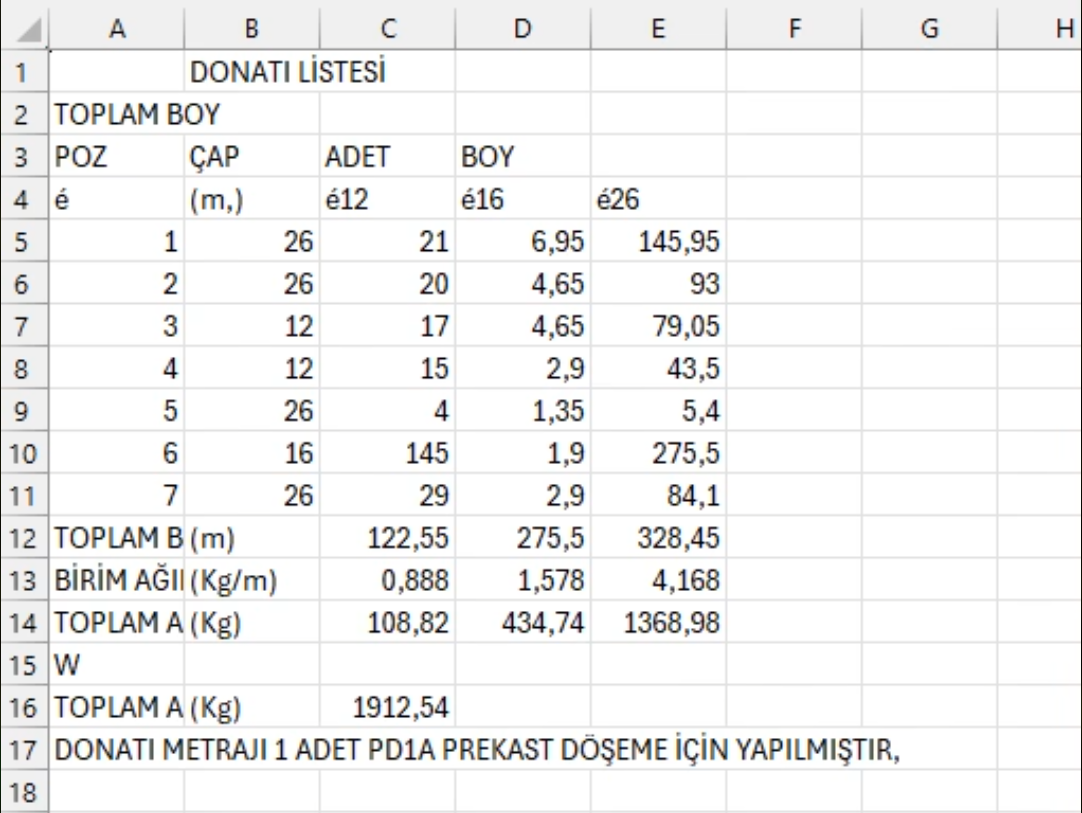

TABLOAKTAR exporting an exploded AutoCAD table to Excel
FAQ

Questions about this add-in

How can I export an exploded AutoCAD table to Excel?

Load TabloAktar with APPLOAD and run the TABLOAKTAR command. It captures the texts between the table lines using their coordinates and writes them to Excel row by row, even when the table is only lines, polylines and loose texts.

Does TabloAktar work with native AutoCAD Table objects too?

Yes. It works both with native AutoCAD Table objects and with tables drawn from Lines and Polylines.

Can it read Text and MText at the same time?

Yes. Standard Text and multi-line MText objects can be selected together.

Does it fix decimal separators for Excel?

Yes. It converts AutoCAD's dotted numbers (10.50) into the comma format (10,50) that regional Excel settings such as Turkish expect.

Is TabloAktar free?

Yes, TabloAktar can be downloaded free of charge from cadlisp.com. It requires the full version of AutoCAD on Windows (not LT).

More add-ins

All add-ins
RebarPro - Rebar schedules, weights and position numbers in seconds.
FreeAutoCAD LISP

RebarPro V03 Beta

Rebar schedules, weights and position numbers in seconds.

REBARDONATI
TabloAktar V1.0Free · 2 KB
Download